Modern solar energy systems are no longer “set it and forget it.” To get the most value, reliability, and peace of mind from your investment, your system needs to be connected. The EG4 WiFi dongle plays a critical role in bringing your inverter online and unlocking full visibility into your system’s performance.

What the EG4 WiFi Dongle Does
The EG4 WiFi dongle connects your EG4 inverter to the internet, allowing real-time monitoring through the manufacturer’s monitoring platform. Once installed and configured, the dongle continuously transmits system data such as:
- Solar production
- Battery state of charge
- Power consumption
- Grid interaction
- System alarms or fault conditions
This data is accessible from your phone or laptop, giving you a clear picture of how your system is performing at any time.
Why Getting Your System Online Matters
Connecting your system is not just a convenience—it is a best practice.
Proactive Monitoring
When your system is online, issues can be identified early. Abnormal battery behavior, reduced solar output, or inverter faults are far easier to catch before they turn into downtime or costly service calls.
Performance Optimization
Monitoring allows you to understand usage patterns and production trends. This insight helps you optimize loads, adjust settings, and ensure your system is operating as efficiently as possible.
Faster Support and Troubleshooting
If technical support is ever needed, having your system online allows technicians to review data remotely. This often leads to faster diagnosis and resolution, reducing unnecessary site visits.
Peace of Mind
Whether you are home or away, you can confirm that your system is operating normally. For off-grid and backup systems especially, this visibility is invaluable.
WiFi Requirements: 2.4GHz Is Critical
One of the most common setup issues with the EG4 WiFi dongle is network compatibility. The dongle requires a 2.4GHz WiFi network.
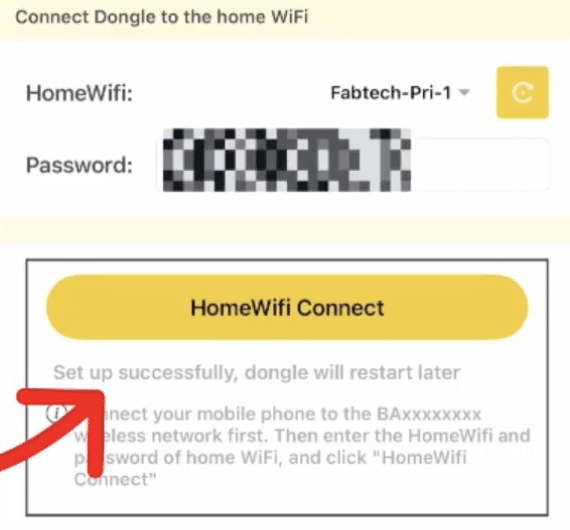
Many modern routers broadcast both 2.4GHz and 5GHz bands under the same network name, while some devices default to 5GHz only. Since the EG4 dongle cannot connect to 5GHz networks, it is important to verify the following:
- Your router has a 2.4GHz band enabled
- Your phone or laptop is capable of connecting to 2.4GHz during setup
- You are within reasonable range of the inverter during configuration
If needed, temporarily disabling the 5GHz band or creating a dedicated 2.4GHz SSID can simplify the setup process.
Using Your Phone or Laptop for Setup
The EG4 WiFi dongle can be configured using either a smartphone or a laptop. Both methods work well, as long as the device:
- Supports 2.4GHz WiFi
- Has a stable connection
- Is close to the inverter during setup
Once the dongle is configured and connected, it will automatically maintain communication with the monitoring platform.
Final Thoughts
The EG4 WiFi dongle is a small component with a significant impact. By getting your system online, you gain visibility, control, and confidence in your solar investment. Ensuring you have a 2.4GHz WiFi network and a compatible phone or laptop will make the setup process smooth and frustration-free.
If you have not yet connected your system, now is the time. Monitoring is not just an add-on—it is a key part of owning and maintaining a reliable energy system.